NPU for Visual Language Models#
This demo shows how to deploy VLM models in the OpenVINO Model Server with NPU acceleration.
From the client perspective it is very similar to the generative model deployment with continuous batching
Likewise it exposes the models via OpenAI API chat/completions.
The difference is that it doesn’t support request batching. They can be sent concurrently but they are processed sequentially.
It is targeted on client machines equipped with NPU accelerator.
Note: This demo was tested on MeteorLake, LunarLake, ArrowLake platforms on Windows11 and Ubuntu24.
Prerequisites#
OVMS 2025.1 or higher
Model Server deployment: Installed Docker Engine or OVMS binary package according to the baremetal deployment guide
(Optional) Client: git and Python for using OpenAI client package and vLLM benchmark app
Note that by default, NPU sets limitation on the prompt length (which in VLM also include image tokens) to 1024 tokens. You can modify that limit by using --max_prompt_len parameter.
Note: You can change the model used in the demo out of any topology tested with OpenVINO.
Create directory for the model:
mkdir -p models
The default configuration should work in most cases but the parameters can be tuned via export_model.py script arguments. Run the script with --help argument to check available parameters and see the LLM calculator documentation to learn more about configuration options.
Server Deployment#
Deploying with Docker
Running this command starts the container with NPU enabled:
docker run -d --rm --device /dev/accel --group-add=$(stat -c "%g" /dev/dri/render* | head -n 1) -u $(id -u):$(id -g) -p 8000:8000 -v $(pwd)/models:/models:rw openvino/model_server:latest-gpu --rest_port 8000 --model_repository_path /models --source_model OpenVINO/Phi-3.5-vision-instruct-fp16-ov --task text_generation --target_device NPU
Deploying on Bare Metal
Assuming you have unpacked model server package, make sure to:
On Windows: run
setupvarsscriptOn Linux: set
LD_LIBRARY_PATHandPATHenvironment variables
as mentioned in deployment guide, in every new shell that will start OpenVINO Model Server.
ovms --rest_port 8000 --model_repository_path models --source_model OpenVINO/Phi-3.5-vision-instruct-fp16-ov --task text_generation --target_device NPU
Readiness Check#
Wait for the model to load. You can check the status with a simple command:
curl http://localhost:8000/v3/models
{
  "object": "list",
  "data": [
    {
      "id": "OpenVINO/Phi-3.5-vision-instruct-fp16-ov",
      "object": "model",
      "created": 1773742559,
      "owned_by": "OVMS"
    }
  ]
}
Request Generation#
pip3 install requests
curl https://raw.githubusercontent.com/openvinotoolkit/model_server/refs/heads/main/demos/common/static/images/zebra.jpeg -o zebra.jpeg
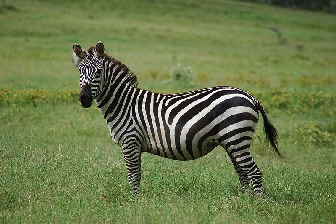
Unary call with curl using image from local filesystem
Referring to local filesystem images in requests requires passing additional parameter --allowed_local_media_path (described in Model Server Parameters section) when starting docker container:
docker run -d --rm --device /dev/accel --group-add=$(stat -c "%g" /dev/dri/render* | head -n 1) -u $(id -u):$(id -g) -p 8000:8000 -v $(pwd)/models:/models:rw openvino/model_server:latest-gpu --rest_port 8000 --model_repository_path /models --source_model OpenVINO/Phi-3.5-vision-instruct-fp16-ov --task text_generation --target_device NPU --allowed_local_media_path /images
curl http://localhost:8000/v3/chat/completions -H "Content-Type: application/json" -d "{ \"model\": \"OpenVINO/Phi-3.5-vision-instruct-fp16-ov\", \"messages\":[{\"role\": \"user\", \"content\": [{\"type\": \"text\", \"text\": \"Describe what is one the picture.\"},{\"type\": \"image_url\", \"image_url\": {\"url\": \"/images/zebra.jpeg\"}}]}], \"max_completion_tokens\": 100}"
{
  "choices": [
    {
      "finish_reason": "stop",
      "index": 0,
      "logprobs": null,
      "message": {
        "content": "The picture features a zebra standing in a grassy plain. Zebras are known for their distinctive black and white striped patterns, which help them blend in for camouflage purposes. The zebra pictured is standing on a green field with patches of grass, indicating it may be in its natural habitat. Zebras are typically social animals and are often found in savannahs and grasslands.",
        "role": "assistant"
      }
    }
  ],
  "created": 1741731554,
  "model": "OpenVINO/Phi-3.5-vision-instruct-fp16-ov",
  "object": "chat.completion",
  "usage": {
    "prompt_tokens": 19,
    "completion_tokens": 83,
    "total_tokens": 102
  }
}
Unary call with python requests library
import requests
import base64
base_url='http://127.0.0.1:8000/v3'
model_name = "OpenVINO/Phi-3.5-vision-instruct-fp16-ov"

def convert_image(Image):
    with open(Image,'rb' ) as file:
        base64_image = base64.b64encode(file.read()).decode("utf-8")
    return base64_image

import requests
payload = {
    "model": model_name,
    "messages": [
        {
            "role": "user",
            "content": [
              {"type": "text", "text": "Describe what is one the picture."},
              {"type": "image_url", "image_url": {"url": f"data:image/jpeg;base64,{convert_image('zebra.jpeg')}"}}
            ]
        }
        ],
    "max_completion_tokens": 100
}
headers = {"Content-Type": "application/json", "Authorization": "not used"}
response = requests.post(base_url + "/chat/completions", json=payload, headers=headers)
print(response.text)
{
  "choices": [
    {
      "finish_reason": "stop",
      "index": 0,
      "message": {
        "content": "The picture features a single zebra standing in a grassy field with well-defined black and white stripes, distinctive facial markings, and a mane that is black at the base tapering into white at the tips. The zebra pays no attention to the camera, and it is likely identified as a horse due to its body size and the visible horns that resemble small antlers, which could indicate a moment of embarrassment or enduring a little pr",
        "role": "assistant"
      }
    }
  ],
  "created": 1773738822,
  "model": "OpenVINO/Phi-3.5-vision-instruct-fp16-ov",
  "object": "chat.completion",
  "usage": {
    "prompt_tokens": 26,
    "completion_tokens": 100,
    "total_tokens": 126
  }
}
Unary call with OpenAI Python package
The endpoints chat/completions are compatible with OpenAI client so it can be easily used to generate code also in streaming mode:
Install the client library:
The endpoints chat/completions are compatible with OpenAI client so it can be easily used to generate code also in streaming mode:
Install the client library:
pip3 install openai
from openai import OpenAI
import base64
base_url='http://localhost:8000/v3'
model_name = "OpenVINO/Phi-3.5-vision-instruct-fp16-ov"

client = OpenAI(api_key='unused', base_url=base_url)

def convert_image(Image):
    with open(Image,'rb' ) as file:
        base64_image = base64.b64encode(file.read()).decode("utf-8")
    return base64_image

stream = client.chat.completions.create(
    model=model_name,
    messages=[
        {
            "role": "user",
            "content": [
              {"type": "text", "text": "Describe what is one the picture."},
              {"type": "image_url", "image_url": {"url": f"data:image/jpeg;base64,{convert_image('zebra.jpeg')}"}}
            ]
        }
        ],
    stream=True,
)
for chunk in stream:
    if chunk.choices[0].delta.content is not None:
        print(chunk.choices[0].delta.content, end="", flush=True)
Output:
The picture features a single zebra standing in a grassy field with well-defined black and white stripes, distinctive facial markings, and a mane that is black at the base tapering into white at the tips. The zebra pays no attention to the camera, and it is likely identified as a horse due to its body size and the visible horns that resemble small antlers, which could indicate a moment of embarrassment or enduring a little prank. Its eyes are black, and its ears are partially open, showing some interest in its surroundings. Its tail is black with a white stripe and a black tip at its end. The zebra appears to be well-fed and healthy, walking between the lush green grasses and a small patch of yellow flowers. Overall, the scene captured is both peaceful and candid, with the zebra immersed in its natural habitat.
Benchmarking text generation with high concurrency#
OpenVINO Model Server with NPU acceleration process the requests sequentially. For that reason, benchmarking should be performed in max_concurrency set to 1. Parallel requests will be accepted but they will wait for a free execution slot. Benchmarking can be demonstrated using benchmarking app from vLLM repository:
git clone --branch v0.7.3 --depth 1 https://github.com/vllm-project/vllm
cd vllm
pip3 install -r requirements-cpu.txt --extra-index-url https://download.pytorch.org/whl/cpu
cd benchmarks
curl -L https://huggingface.co/datasets/anon8231489123/ShareGPT_Vicuna_unfiltered/resolve/main/ShareGPT_V3_unfiltered_cleaned_split.json -o ShareGPT_V3_unfiltered_cleaned_split.json # sample dataset
python benchmark_serving.py --backend openai-chat --dataset-name hf --dataset-path lmarena-ai/vision-arena-bench-v0.1 --hf-split train --host localhost --port 8000 --model OpenVINO/Phi-3.5-vision-instruct-fp16-ov --endpoint /v3/chat/completions --num-prompts 10 --trust-remote-code --max-concurrency 1
Testing the model accuracy over serving API#
Check the guide of using lm-evaluation-harness
Limitations#
requests MUST include one and only one image in the messages context. Other request will be rejected.
beam_search algorithm is not supported with NPU. Greedy search and multinomial algorithms are supported.
models must be exported with INT4 precision and
--sym --ratio 1.0 --group-size -1params. This is enforced in the export_model.py script when the target_device in NPU.log_probs are not supported
finish reason is always set to “stop”.
only a single response can be returned. Parameter
nis not supported.