Cline Coding Agent with OpenVINO Model Server#
Intro#
Cline is an autonomous coding agent extension for Visual Studio Code. It can read and edit files, run terminal commands, browse the web and call tools exposed by MCP servers, all driven by an LLM reachable through an OpenAI-compatible API. This demo shows how to serve that LLM locally with OpenVINO Model Server (OVMS) so that Cline runs entirely on your own machine, without sending code or prompts to an external service.
Requirements#
Windows (standalone package) or Linux (Docker)
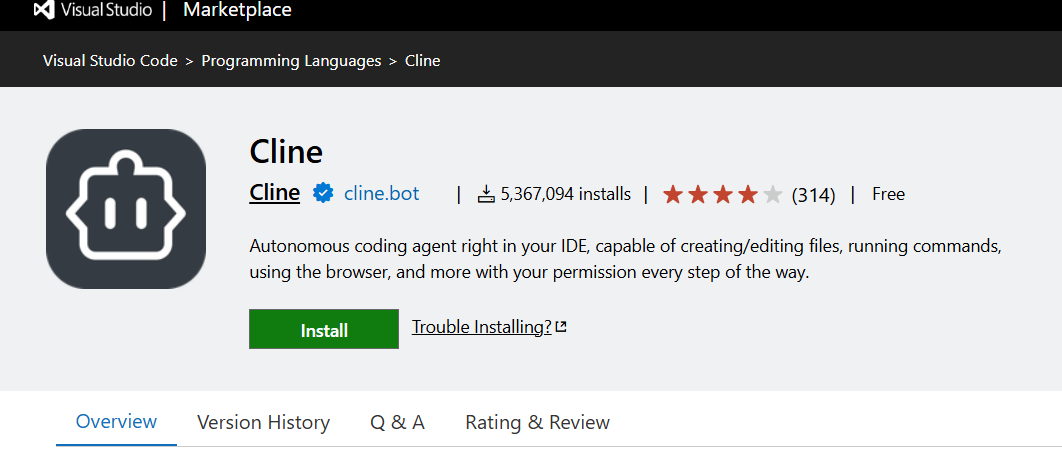
Visual Studio Code with the Cline extension installed
Make sure that Cline works with
nextversion (to change it go to Visual Studio Code settings and search@ext:saoudrizwan.claude-dev, checknextoption from dropdown)Hardware: Tested on Intel Core Ultra iGPU with 32GB RAM and a discrete Intel Arc B70 GPU (dedicated VRAM).
Qwen3-Coder-Nextcan be deployed on iGPU with 64GB RAM on board.Memory requirements depend on the chosen model (see table below)
Suggested models#
Model |
HF Link |
Notes |
|---|---|---|
|
Vision-capable (VLM); general purpose chat/agent model |
|
|
Vision-capable (VLM); general purpose chat/agent model |
|
|
Vision-capable (VLM); general purpose chat/agent model |
|
|
General purpose chat/agent model |
|
|
To be published soon |
Big coding model; available only on iGPU with minimum 64GB of RAM |
|
Smaller model, use when RAM/VRAM is limited or for quick, low-latency edits; not recommended for harder coding tasks |
Deploy OVMS#
Windows: deploying on bare metal#
All models can be deployed with the same command, only --source_model parameter should be changed to desired model.
mkdir c:\models
ovms --model_repository_path c:\models --source_model OpenVINO/Qwen3.8-27B-int8-ov --rest_port 8000
Linux: via Docker#
All models can be deployed with the same command, only --source_model parameter should be changed to desired model.
mkdir -p ${HOME}/models
export GPU_ARGS=$(if ls /dev/dri/render* >/dev/null 2>&1; then echo "--device /dev/dri --group-add $(stat -c '%g' /dev/dri/render* | head -n1)"; fi)
docker run -d -p 8000:8000 --rm --user $(id -u):$(id -g) -v ${HOME}/models:/models/:rw ${GPU_ARGS} \
    openvino/model_server:latest-gpu \
    --model_repository_path /models --source_model OpenVINO/Qwen3.8-27B-int8-ov --rest_port 8000
Set Up Visual Studio Code#
Install the Cline extension#
Point Cline at your OVMS instance#
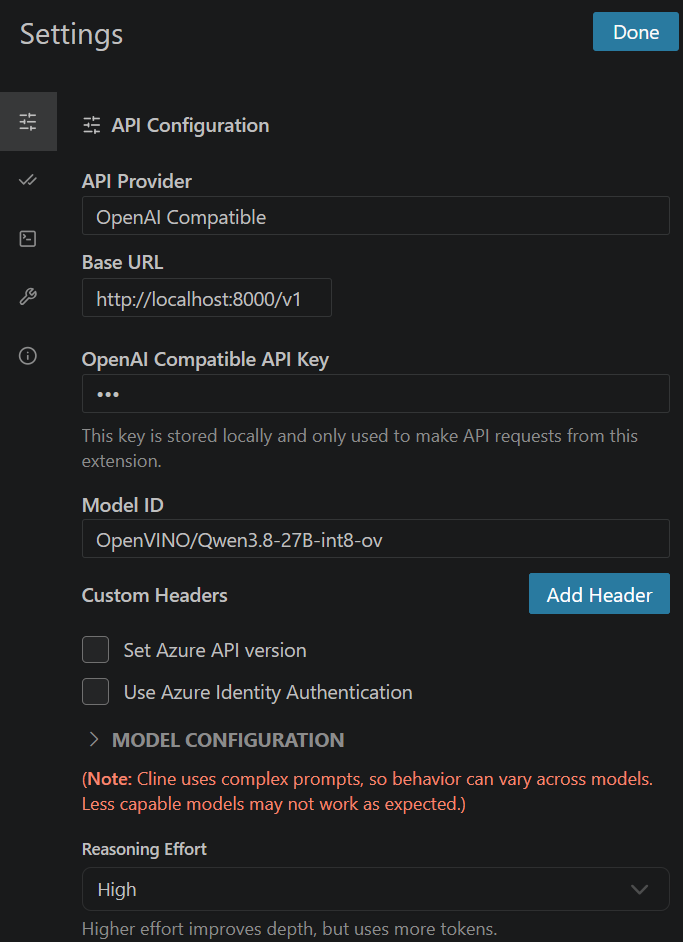
Open Cline’s settings and add a new API provider configuration:
API Provider:
OpenAI CompatibleBase URL:
http://localhost:8000/v1API Key: any placeholder value, e.g.
unused(unless configured on OVMS server side)Model ID: value provided as
--source_model, e.g.OpenVINO/Qwen3.8-27B-int8-ovor as the--model_namee.g.ovms-model
Cline lets Plan mode and Act mode use different models/providers, so you can, for example, use
Qwen3.6-35B-A3B-int4-ov for Plan-mode reasoning and switch to Qwen3.8-27B (on B70) for Act-mode code changes.
You can set that checking Use different models for Plan and Act modes.
Running two large models like these at the same time can exceed available RAM/VRAM, so configure OVMS’s idle servable management (preview feature) to keep only the model used by the active mode loaded; switching modes in Cline then wakes up the other model on demand instead of requiring both to be resident at once.
Usage examples#
Chat (Plan mode)#
Ask a question about the codebase without letting Cline make changes:
Explain how request validation works in this repository and list the files involved.
Coding / agentic (Act mode)#
Switch to Act mode and give Cline a task that requires editing files and running commands:
Add a unit test for the `parseConfig` function and run the test suite to confirm it passes.
Cline will use its built-in tools (file read/write, terminal, browser) to make the change and verify it, relying on OVMS’s auto-detected tool-call format (derived from the model’s chat template) to turn the model’s tool calls into these actions.
Image input#
With Qwen3.8-27B-int8-ov, Qwen3.6-35B-A3B-int4-ov or Muse-Glimmer-30B-int4-ov deployed as a VLM, attach an
image to a Cline chat message, e.g.:
[attach a screenshot of a UI bug]
What is wrong with this layout and which CSS file should I fix?
Image attachments are only available when the configured model declares supportsImages in Cline’s model
configuration; enable it for the custom OpenAI-compatible model entry when using a vision-capable model like
Qwen3.8-27B-int8-ov.
reasoning_effort usage#
Cline exposes a reasoning-effort control that is sent as part of the chat
completion request. OVMS supports the OpenAI API reasoning_effort field natively, so this setting is honored
across all of the suggested models above, regardless of the underlying chat template.
It may be changed in Cline’s Settings under Reasoning Effort section.
Coding task#
For coding task example check CodingAgenticWorflow Demo.
Agentic and coding capabilities summary#
Agentic: Act mode combines the model’s tool-calling ability (auto-detected by OVMS from the model’s chat template) with Cline’s built-in tools (terminal, file read/write, browser) and any MCP servers you register, letting Cline plan and execute multi-step tasks autonomously.
Coding: Use
Qwen3.8-27Bon B70 orQwen3-Coder-Nexton iGPU for the strongest code generation/editing quality among the suggested models; fall back toQwen3.5-9Bfor lightweight or latency-sensitive edits.MCP: any MCP server (weather, filesystem, browser, etc.) becomes available to Cline the same way it is available to the OpenAI Agents SDK example in the agentic AI demo.
Image input: use
Qwen3.8-27B,Qwen3.6-35B-A3B-int4-ovorMuse-Glimmer-30B-int4-ovfor prompts that include screenshots or diagrams.