Visual Studio Code Local Assistant#
Intro#
With the rise of AI PC capabilities, hosting own Visual Studio code assistant is at your reach. In this demo, we will showcase how to deploy local LLM serving with OVMS and integrate it with Continue extension. It will employ GPU acceleration.
Requirements#
Windows (for standalone app) or Linux (using Docker)
Python installed (for model preparation only)
Intel Meteor Lake, Lunar Lake, Arrow Lake or Panther Lake.
Memory requirements depend on the model size
Windows: deploying on bare metal#
mkdir c:\models
ovms --model_repository_path c:\models --source_model OpenVINO/Qwen3-Coder-30B-A3B-Instruct-int4-ov --task text_generation --target_device GPU --tool_parser qwen3coder --rest_port 8000 --cache_dir .ovcache --model_name Qwen3-Coder-30B-A3B-Instruct
Note: For deployment, the model requires ~16GB disk space and recommended 19GB+ of VRAM on the GPU.
Note: An int8 variant is also available:
OpenVINO/Qwen3-Coder-30B-A3B-Instruct-int8-ov. It offers higher accuracy but requires 34GB+ of VRAM on the GPU.
mkdir c:\models
ovms --model_repository_path c:\models --source_model OpenVINO/gpt-oss-20b-int4-ov --task text_generation --target_device GPU --tool_parser gptoss --reasoning_parser gptoss --rest_port 8000 --cache_dir .ovcache --model_name gpt-oss-20b
Note: For deployment, the model requires ~12GB disk space and recommended 16GB+ of VRAM on the GPU.
mkdir c:\models
ovms --model_repository_path c:\models --source_model OpenVINO/Qwen3-8B-int4-ov --task text_generation --target_device GPU --tool_parser hermes3 --reasoning_parser qwen3 --rest_port 8000 --cache_dir .ovcache --model_name Qwen3-8B
Note: For deployment, the model requires ~4GB disk space and recommended 6GB+ of VRAM on the GPU.
mkdir c:\models
ovms --model_repository_path c:\models --source_model OpenVINO/Qwen3-8B-int4-cw-ov --task text_generation --target_device NPU --tool_parser hermes3 --rest_port 8000 --max_prompt_len 16384 --plugin_config "{\"NPUW_LLM_PREFILL_ATTENTION_HINT\":\"PYRAMID\"}" --cache_dir .ovcache --model_name Qwen3-8B
Note: First model initialization might be long. With the compilation cache, sequential model loading will be fast.
mkdir c:\models
ovms --model_repository_path c:\models --source_model OpenVINO/Qwen3-VL-8B-Instruct-int4-ov --task text_generation --target_device GPU --pipeline_type VLM_CB --rest_port 8000 --cache_dir .ovcache --model_name Qwen3-VL-8B-Instruct
Note: This is a Vision Language Model (VLM) that supports image inputs. For deployment, recommended 7GB+ of VRAM on the GPU.
Linux: via Docker#
mkdir -p models
docker run -d -p 8000:8000 --rm --user $(id -u):$(id -g) -v $(pwd)/models:/models/:rw --device /dev/dri --group-add=$(stat -c "%g" /dev/dri/render* | head -n 1) \
    openvino/model_server:2026.4.1-gpu \
    --model_repository_path /models --source_model OpenVINO/Qwen3-Coder-30B-A3B-Instruct-int4-ov --task text_generation --target_device GPU --tool_parser qwen3coder --rest_port 8000 --model_name Qwen3-Coder-30B-A3B-Instruct
Note: For deployment, the model requires ~16GB disk space and recommended 19GB+ of VRAM on the GPU.
Note: An int8 variant is also available:
OpenVINO/Qwen3-Coder-30B-A3B-Instruct-int8-ov. It offers higher accuracy but requires 34GB+ of VRAM on the GPU.
mkdir -p models
docker run -d -p 8000:8000 --rm --user $(id -u):$(id -g) -v $(pwd)/models:/models/:rw --device /dev/dri --group-add=$(stat -c "%g" /dev/dri/render* | head -n 1) \
    openvino/model_server:2026.4.1-gpu \
    --model_repository_path /models --source_model OpenVINO/gpt-oss-20b-int4-ov --task text_generation --target_device GPU --tool_parser gptoss --reasoning_parser gptoss --rest_port 8000 --model_name gpt-oss-20b
Note: For deployment, the model requires ~12GB disk space and recommended 16GB+ of VRAM on the GPU.
mkdir c:\models
docker run -d -p 8000:8000 --rm --user $(id -u):$(id -g) -v $(pwd)/models:/models/:rw --device /dev/dri --group-add=$(stat -c "%g" /dev/dri/render* | head -n 1) \
    openvino/model_server:2026.4.1-gpu \
    --model_repository_path /models --source_model OpenVINO/Qwen3-8B-int4-ov --task text_generation --target_device GPU --tool_parser hermes3 --reasoning_parser qwen3 --rest_port 8000  --model_name Qwen3-8B
Note: For deployment, the model requires ~4GB disk space and recommended 6GB+ of VRAM on the GPU.
mkdir -p models
docker run -d -p 8000:8000 --rm --user $(id -u):$(id -g) -v $(pwd)/models:/models/:rw --device /dev/accel --group-add=$(stat -c "%g" /dev/dri/render* | head -n 1) \
    openvino/model_server:2026.4.1-gpu \
    --model_repository_path /models --source_model OpenVINO/Qwen3-8B-int4-cw-ov --task text_generation --target_device NPU --tool_parser hermes3 --rest_port 8000 --max_prompt_len 16384 --plugin_config '{"NPUW_LLM_PREFILL_ATTENTION_HINT":"PYRAMID"}' --model_name Qwen3-8B
Note: First model initialization might be long. With the compilation cache, sequential model loading will be fast.
mkdir -p models
docker run -d -p 8000:8000 --rm --user $(id -u):$(id -g) -v $(pwd)/models:/models/:rw --device /dev/dri --group-add=$(stat -c "%g" /dev/dri/render* | head -n 1) \
    openvino/model_server:2026.4.1-gpu \
    --model_repository_path /models --source_model OpenVINO/Qwen3-VL-8B-Instruct-int4-ov --task text_generation --target_device GPU --pipeline_type VLM_CB --rest_port 8000 --model_name Qwen3-VL-8B-Instruct
Note: This is a Vision Language Model (VLM) that supports image inputs. For deployment, recommended 7GB+ of VRAM on the GPU.
Custom models#
Models which are not published in OpenVINO format can be exported and quantized with custom parameters. Below is an example how to export and deploy model Devstral-Small-2507.
mkdir models
python export_model.py text_generation --source_model unsloth/Devstral-Small-2507 --weight-format int4 --config_file_path models/config_all.json --model_repository_path models --tool_parser devstral --target_device GPU
curl -L -o models/unsloth/Devstral-Small-2507/chat_template.jinja https://raw.githubusercontent.com/openvinotoolkit/model_server/refs/heads/releases/2026/4/extras/chat_template_examples/chat_template_devstral.jinja

ovms --model_repository_path models --source_model unsloth/Devstral-Small-2507 --task text_generation --target_device GPU --tool_parser devstral --rest_port 8000 --cache_dir .ovcache
Note: Exporting models is a one time operation but might consume RAM at least of the model size and might take a lot of time depending on the model size.
Set Up Visual Studio Code#
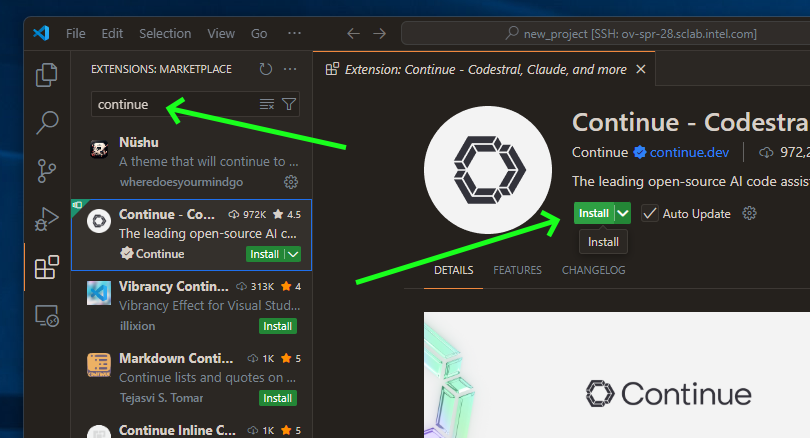
Download Continue plugin#
Note: This demo has been tested with Continue plugin version
1.2.11. While newer versions should work, some configuration options may vary.
Setup Local Assistant#
We need to point Continue plugin to our OpenVINO Model Server instance. Open configuration file:
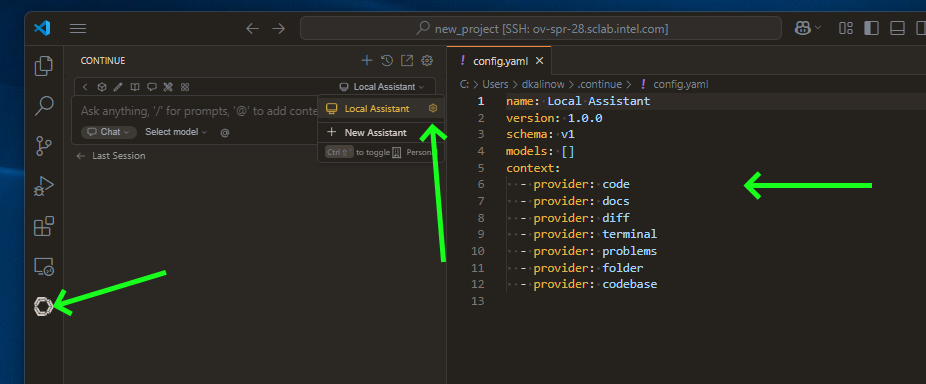
Prepare a config:
name: Local Assistant
version: 1.0.0
schema: v1
models:
  - name: OVMS Qwen3-Coder-30B-A3B-Instruct
    provider: openai
    model: Qwen3-Coder-30B-A3B-Instruct
    apiKey: unused
    apiBase: http://localhost:8000/v3
    roles:
      - chat
      - edit
      - apply
      - autocomplete
    capabilities:
      - tool_use
    autocompleteOptions:
      maxPromptTokens: 500
      debounceDelay: 124
      modelTimeout: 400
      onlyMyCode: true
      useCache: true
context:
  - provider: code
  - provider: docs
  - provider: diff
  - provider: terminal
  - provider: problems
  - provider: folder
  - provider: codebase
name: Local Assistant
version: 1.0.0
schema: v1
models:
  - name: OVMS gpt-oss-20b
    provider: openai
    model: gpt-oss-20b
    apiKey: unused
    apiBase: http://localhost:8000/v3
    roles:
      - chat
      - edit
      - apply
    capabilities:
      - tool_use
  - name: OVMS gpt-oss-20b autocomplete
    provider: openai
    model: gpt-oss-20b
    apiKey: unused
    apiBase: http://localhost:8000/v3
    roles:
      - autocomplete
    capabilities:
      - tool_use
    requestOptions:
      extraBodyProperties:
        reasoning_effort:
          none
    autocompleteOptions:
      maxPromptTokens: 500
      debounceDelay: 124
      useCache: true
      onlyMyCode: true
      modelTimeout: 400
context:
  - provider: code
  - provider: docs
  - provider: diff
  - provider: terminal
  - provider: problems
  - provider: folder
  - provider: codebase
name: Local Assistant
version: 1.0.0
schema: v1
models:
  - name: OVMS unsloth/Devstral-Small-2507
    provider: openai
    model: unsloth/Devstral-Small-2507
    apiKey: unused
    apiBase: http://localhost:8000/v3
    roles:
      - chat
      - edit
      - apply
      - autocomplete
    capabilities:
      - tool_use
    autocompleteOptions:
      maxPromptTokens: 500
      debounceDelay: 124
      useCache: true
      onlyMyCode: true
      modelTimeout: 400
context:
  - provider: code
  - provider: docs
  - provider: diff
  - provider: terminal
  - provider: problems
  - provider: folder
  - provider: codebase
name: Local Assistant
version: 1.0.0
schema: v1
models:
  - name: OVMS Qwen3-8B
    provider: openai
    model: Qwen3-8B
    apiKey: unused
    apiBase: http://localhost:8000/v3
    roles:
      - chat
      - edit
      - apply
    capabilities:
      - tool_use
    requestOptions:
      extraBodyProperties:
        chat_template_kwargs:
          enable_thinking: false
context:
  - provider: code
  - provider: docs
  - provider: diff
  - provider: terminal
  - provider: problems
  - provider: folder
  - provider: codebase
name: Local Assistant
version: 1.0.0
schema: v1
models:
  - name: OVMS Qwen3-VL-8B-Instruct
    provider: openai
    model: Qwen3-VL-8B-Instruct
    apiKey: unused
    apiBase: http://localhost:8000/v3
    roles:
      - chat
      - edit
      - apply
    capabilities:
      - tool_use
      - image_input
context:
  - provider: code
  - provider: docs
  - provider: diff
  - provider: terminal
  - provider: problems
  - provider: folder
  - provider: codebase
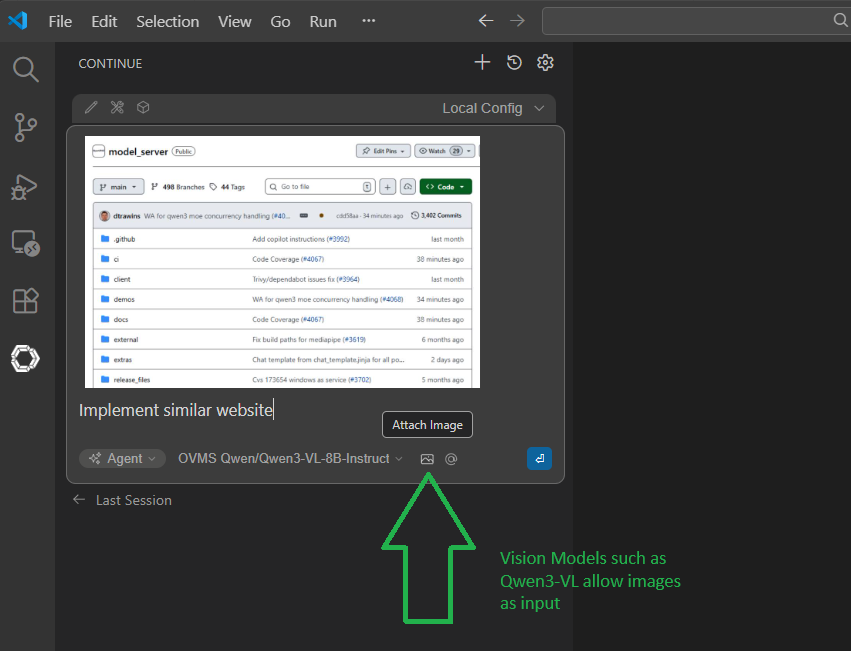
Note: For Vision Language Models (VLM) like Qwen3-VL-8B-Instruct, add
image_inputto thecapabilitieslist in the Continue config. This enables the image modality, allowing you to send images in chat messages for the model to analyze.
Note: For more information about this config, see configuration reference.
Chatting, code editing and autocompletion in action#
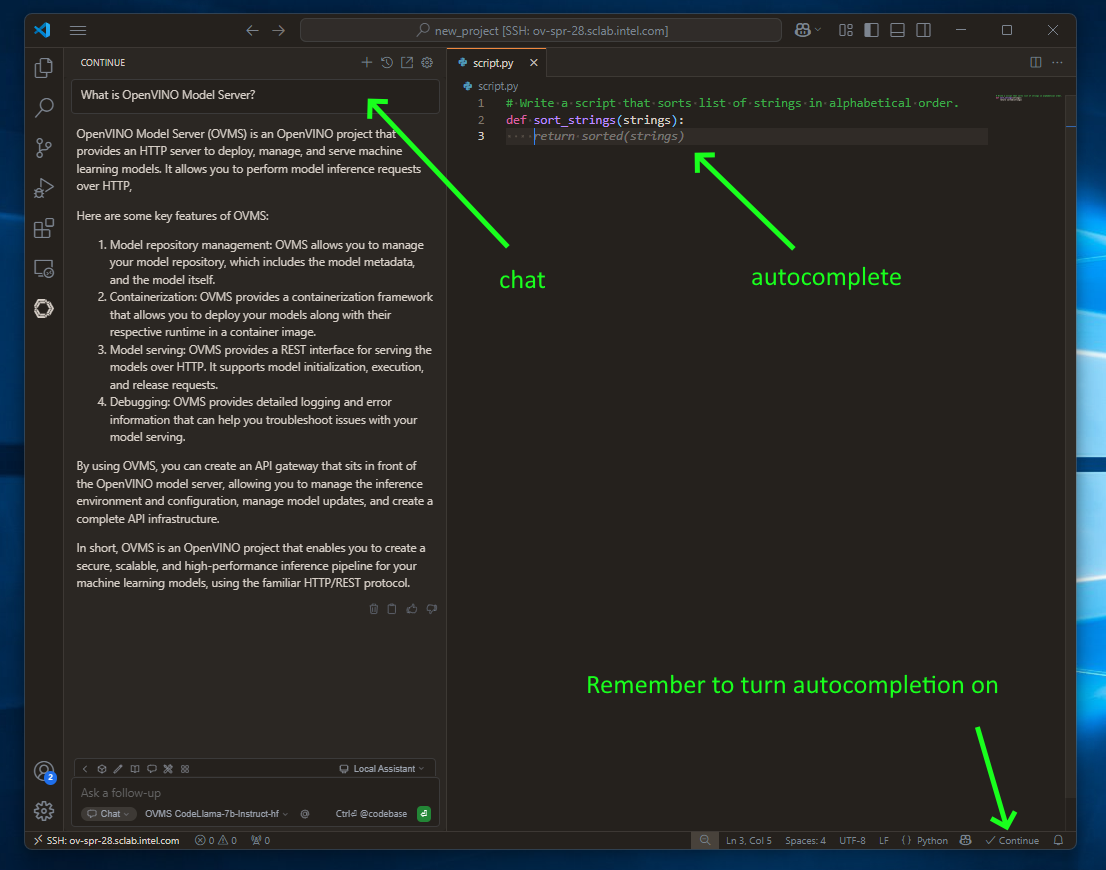
to use chatting feature click continue button on the left sidebar
use
CTRL+Ito select and include source in chat messageuse
CTRL+Lto select and edit the source via chat requestsimply write code to see code autocompletion (NOTE: this is turned off by default)
AI Agents in action#
Continue.dev plugin is shipped with multiple built-in tools. For full list please visit Continue documentation.
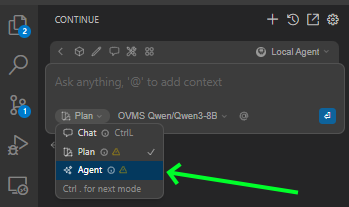
To use them, select Agent Mode:
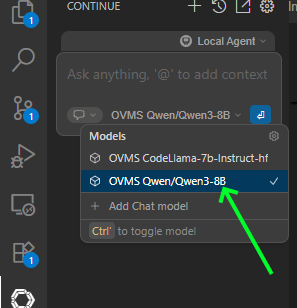
Select model that support tool calling from model list:
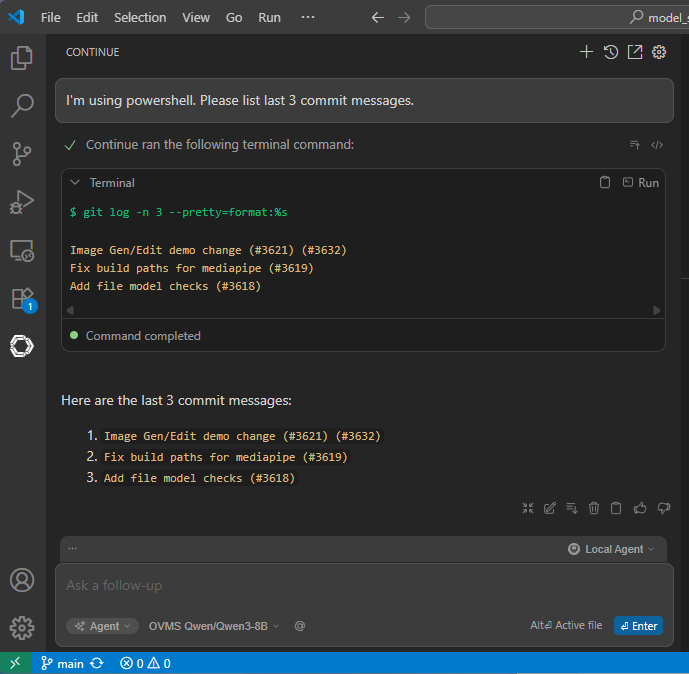
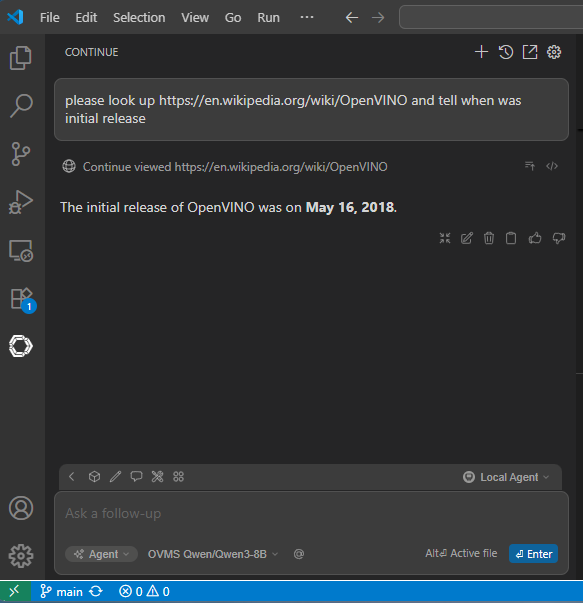
Example use cases for tools:
Run terminal commands
Look up web links
Search files
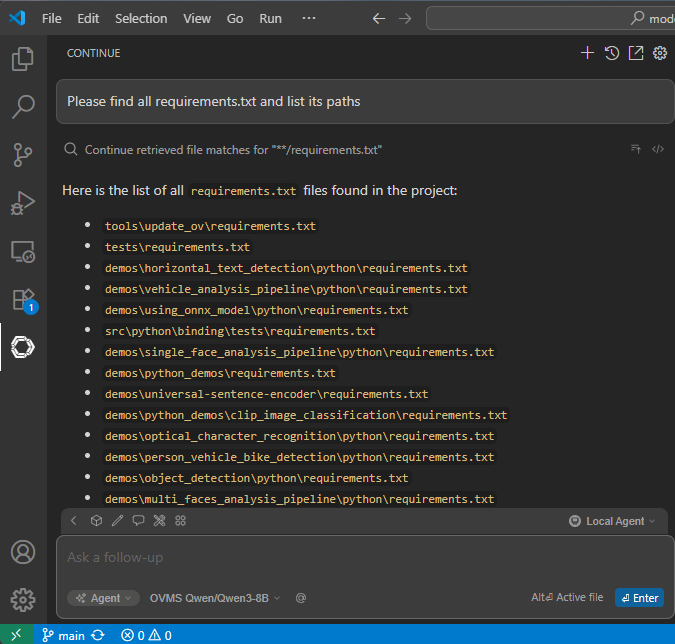
Image input
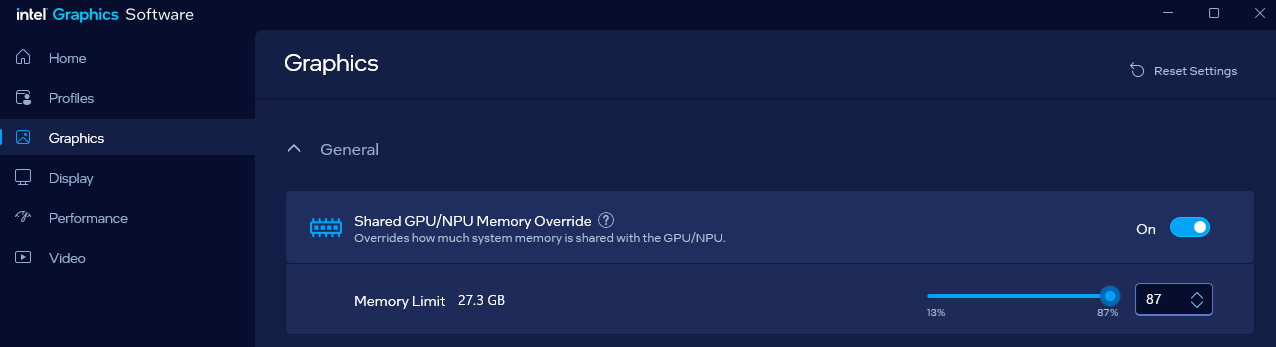
Extending VRAM allocation to iGPU to enable loading bigger models