Agentic AI with OpenVINO Model Server#
OpenVINO Model Server can be used to serve language models for AI Agents. It supports the usage of tools in the context of content generation. It can be integrated with MCP servers and AI agent frameworks. You can learn more about tools calling based on OpenAI API
Here are presented required steps to deploy language models trained for tools support. The diagram depicting the demo setup is below:
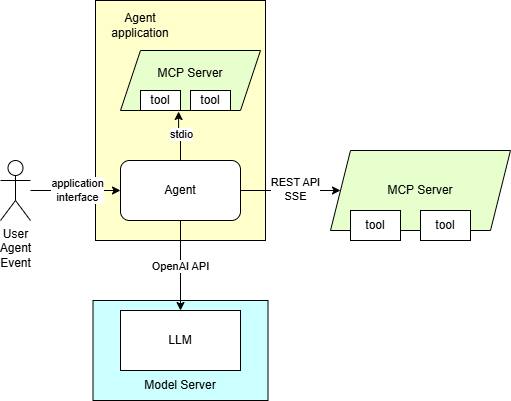
The application employing OpenAI agent SDK is using MCP server. It is equipped with a set of tools to providing context for the content generation. The tools can also be used for automation purposes based on input in text format.
Note: On Windows, make sure to use the weekly or 2025.4 release packages for proper functionality.
Export LLM model#
Currently supported models:
Qwen/Qwen3-8B
Qwen/Qwen3-4B
meta-llama/Llama-3.1-8B-Instruct
meta-llama/Llama-3.2-3B-Instruct
NousResearch/Hermes-3-Llama-3.1-8B
mistralai/Mistral-7B-Instruct-v0.3
microsoft/Phi-4-mini-instruct
Qwen/Qwen3-Coder-30B-A3B-Instruct
openai/gpt-oss-20b*
Note: GPT-OSS is validated with
--pipeline_type LMfor export and--target device GPU2025.4.1, expect continuous batching and CPU support in weekly or 2026.0+ releases.
Export using python script#
Use those steps to convert the model from HugginFace Hub to OpenVINO format and export it to a local storage.
# Download export script, install its dependencies and create directory for the models
curl https://raw.githubusercontent.com/openvinotoolkit/model_server/refs/heads/releases/2025/4/demos/common/export_models/export_model.py -o export_model.py
pip3 install -r https://raw.githubusercontent.com/openvinotoolkit/model_server/refs/heads/releases/2025/4/demos/common/export_models/requirements.txt
mkdir models
Run export_model.py script to download and quantize the model:
Note: The users in China need to set environment variable HF_ENDPOINT=”https://hf-mirror.com” or “https://www.modelscope.cn/models” before running the export script to connect to the HF Hub.
python export_model.py text_generation --source_model Qwen/Qwen3-8B --weight-format int8 --config_file_path models/config.json --model_repository_path models --tool_parser hermes3
python export_model.py text_generation --source_model Qwen/Qwen3-4B --weight-format int8 --config_file_path models/config.json --model_repository_path models --tool_parser hermes3
python export_model.py text_generation --source_model meta-llama/Llama-3.1-8B-Instruct --weight-format int8 --config_file_path models/config.json --model_repository_path models --tool_parser llama3
curl -L -o models/meta-llama/Llama-3.1-8B-Instruct/chat_template.jinja https://raw.githubusercontent.com/vllm-project/vllm/refs/tags/v0.9.0/examples/tool_chat_template_llama3.1_json.jinja
python export_model.py text_generation --source_model meta-llama/Llama-3.2-3B-Instruct --weight-format int8 --config_file_path models/config.json --model_repository_path models --tool_parser llama3
curl -L -o models/meta-llama/Llama-3.2-3B-Instruct/chat_template.jinja https://raw.githubusercontent.com/vllm-project/vllm/refs/tags/v0.9.0/examples/tool_chat_template_llama3.2_json.jinja
python export_model.py text_generation --source_model NousResearch/Hermes-3-Llama-3.1-8B --weight-format int8 --config_file_path models/config.json --model_repository_path models --tool_parser hermes3
curl -L -o models/NousResearch/Hermes-3-Llama-3.1-8B/chat_template.jinja https://raw.githubusercontent.com/vllm-project/vllm/refs/tags/v0.9.0/examples/tool_chat_template_hermes.jinja
python export_model.py text_generation --source_model mistralai/Mistral-7B-Instruct-v0.3 --weight-format int8 --config_file_path models/config.json --model_repository_path models --tool_parser mistral --extra_quantization_params "--task text-generation-with-past"
curl -L -o models/mistralai/Mistral-7B-Instruct-v0.3/chat_template.jinja https://raw.githubusercontent.com/vllm-project/vllm/refs/tags/v0.10.1.1/examples/tool_chat_template_mistral_parallel.jinja
python export_model.py text_generation --source_model Qwen/Qwen3-Coder-30B-A3B-Instruct --weight-format int8 --config_file_path models/config.json --model_repository_path models --tool_parser qwen3coder
curl -L -o models/Qwen/Qwen3-Coder-30B-A3B-Instruct/chat_template.jinja https://raw.githubusercontent.com/openvinotoolkit/model_server/refs/heads/releases/2025/4/extras/chat_template_examples/chat_template_qwen3coder_instruct.jinja
python export_model.py text_generation --source_model openai/gpt-oss-20b --weight-format int4 --config_file_path models/config.json --model_repository_path models --tool_parser gptoss --reasoning_parser gptoss --pipeline_type LM
curl -L -o models/openai/gpt-oss-20b/chat_template.jinja https://raw.githubusercontent.com/openvinotoolkit/model_server/refs/heads/releases/2025/4/extras/chat_template_examples/chat_template_gpt_oss_multiturn.jinja
Note:: Use
--pipeline_type LMfor export and--target device GPUfor deployment. Using weekly release, it is recommended to drop--pipeline_type LMto enable continuous batching.
Note: This model requires a fix in optimum-intel which is currently on a fork.
pip3 install transformers==4.53.3 --force-reinstall
pip3 install "optimum-intel[openvino]"@git+https://github.com/helena-intel/optimum-intel/@ea/lonrope_exp --force-reinstall
python export_model.py text_generation --source_model microsoft/Phi-4-mini-instruct --weight-format int8 --config_file_path models/config.json --model_repository_path models --tool_parser phi4 --max_num_batched_tokens 99999
curl -L -o models/microsoft/Phi-4-mini-instruct/chat_template.jinja https://raw.githubusercontent.com/openvinotoolkit/model_server/refs/heads/releases/2025/4/extras/chat_template_examples/chat_template_phi4_mini.jinja
Note: To use these models on NPU, set
--weight-formatto either int4 or nf4. When specifying--extra_quantization_params, ensure thatratiois set to 1.0 andgroup_sizeis set to -1 or 128. For more details, see OpenVINO GenAI on NPU.
Direct pulling of pre-configured HuggingFace models from docker containers#
This procedure can be used to pull preconfigured models from OpenVINO organization in HuggingFace Hub
docker run --user $(id -u):$(id -g) --rm -v $(pwd)/models:/models:rw openvino/model_server:weekly --pull --model_repository_path /models --source_model OpenVINO/Qwen3-8B-int4-ov --task text_generation --tool_parser hermes3
docker run --user $(id -u):$(id -g) --rm -v $(pwd)/models:/models:rw openvino/model_server:weekly --pull --model_repository_path /models --source_model OpenVINO/Mistral-7B-Instruct-v0.3-int4-ov --task text_generation --tool_parser mistral
curl -L -o models/OpenVINO/Mistral-7B-Instruct-v0.3-int4-ov/chat_template.jinja https://raw.githubusercontent.com/vllm-project/vllm/refs/tags/v0.10.1.1/examples/tool_chat_template_mistral_parallel.jinja
docker run --user $(id -u):$(id -g) --rm -v $(pwd)/models:/models:rw openvino/model_server:weekly --pull --model_repository_path /models --source_model OpenVINO/Phi-4-mini-instruct-int4-ov --task text_generation --tool_parser phi4
curl -L -o models/OpenVINO/Phi-4-mini-instruct-int4-ov/chat_template.jinja https://raw.githubusercontent.com/openvinotoolkit/model_server/refs/heads/releases/2025/4/extras/chat_template_examples/chat_template_phi4_mini.jinja
Direct pulling of pre-configured HuggingFace models on Windows#
Assuming you have unpacked model server package with python enabled version, make sure to run setupvars script
as mentioned in deployment guide, in every new shell that will start OpenVINO Model Server.
ovms.exe --pull --model_repository_path models --source_model OpenVINO/Qwen3-8B-int4-ov --task text_generation --tool_parser hermes3
ovms.exe --pull --model_repository_path models --source_model OpenVINO/Mistral-7B-Instruct-v0.3-int4-ov --task text_generation --tool_parser mistral
curl -L -o models\OpenVINO\Mistral-7B-Instruct-v0.3-int4-ov\chat_template.jinja https://raw.githubusercontent.com/vllm-project/vllm/refs/tags/v0.10.1.1/examples/tool_chat_template_mistral_parallel.jinja
ovms.exe --pull --model_repository_path models --source_model OpenVINO/Phi-4-mini-instruct-int4-ov --task text_generation --tool_parser phi4
curl -L -o models\OpenVINO\Phi-4-mini-instruct-int4-ov\chat_template.jinja https://raw.githubusercontent.com/vllm-project/vllm/refs/tags/v0.9.0/examples/tool_chat_template_phi4_mini.jinja
You can use similar commands for different models. Change the source_model and the weights-format.
Note: Some models give more reliable responses with tuned chat template.
Note: Currently models with tool calls format compatible with Phi4, Llama3, Mistral or Hermes3 are supported.
Start OVMS#
This deployment procedure assumes the model was pulled or exported using the procedure above. The exception are models from OpenVINO organization if they support tools correctly with the default template like “OpenVINO/Qwen3-8B-int4-ov” - they can be deployed in a single command pulling and staring the server.
Deploying on Windows with GPU#
Assuming you have unpacked model server package with python enabled version, make sure to run setupvars script
as mentioned in deployment guide, in every new shell that will start OpenVINO Model Server.
ovms.exe --rest_port 8000 --source_model Qwen/Qwen3-8B --model_repository_path models --tool_parser hermes3 --target_device GPU --task text_generation --cache_dir .cache
ovms.exe --rest_port 8000 --source_model Qwen/Qwen3-4B --model_repository_path models --tool_parser hermes3 --target_device GPU --task text_generation --cache_dir .cache
ovms.exe --rest_port 8000 --source_model meta-llama/Llama-3.1-8B-Instruct --model_repository_path models --tool_parser llama3 --target_device GPU --task text_generation --enable_tool_guided_generation true --cache_dir .cache
ovms.exe --rest_port 8000 --source_model meta-llama/Llama-3.2-3B-Instruct --model_repository_path models --tool_parser llama3 --target_device GPU --task text_generation --enable_tool_guided_generation true --cache_dir .cache
ovms.exe --rest_port 8000 --source_model mistralai/Mistral-7B-Instruct-v0.3 --model_repository_path models --tool_parser mistral --target_device GPU --task text_generation --cache_dir .cache
ovms.exe --rest_port 8000 --source_model microsoft/Phi-4-mini-instruct --model_repository_path models --tool_parser phi4 --target_device GPU --task text_generation --enable_tool_guided_generation true --cache_dir .cache --max_num_batched_tokens 99999
ovms.exe --rest_port 8000 --source_model OpenVINO/Qwen3-8B-int4-ov --model_repository_path models --tool_parser hermes3 --target_device GPU --task text_generation --cache_dir .cache
ovms.exe --rest_port 8000 --source_model OpenVINO/Mistral-7B-Instruct-v0.3-int4-ov --model_repository_path models --tool_parser mistral --target_device GPU --task text_generation --cache_dir .cache
ovms.exe --rest_port 8000 --source_model OpenVINO/Phi-4-mini-instruct-int4-ov --model_repository_path models --tool_parser phi4 --target_device GPU --task text_generation --enable_tool_guided_generation true --cache_dir .cache
ovms.exe --rest_port 8000 --source_model Qwen/Qwen3-Coder-30B-A3B-Instruct --model_repository_path models --tool_parser qwen3coder --target_device GPU --task text_generation --enable_tool_guided_generation true --cache_dir .cache
ovms.exe --rest_port 8000 --source_model openai/gpt-oss-20b --model_repository_path models --tool_parser gptoss --reasoning_parser gptoss --target_device GPU --task text_generation --pipeline_type LM --weight-format int4
Note:: Use
--pipeline_type LMfor export and--target device GPUfor deployment. Expect continuous batching and CPU support in weekly or 2026.0+ releases.
Deploying on Windows with NPU#
ovms.exe --rest_port 8000 --source_model Qwen/Qwen3-8B --model_repository_path models --tool_parser hermes3 --target_device NPU --task text_generation --enable_prefix_caching true --cache_dir .cache --max_prompt_len 4000
ovms.exe --rest_port 8000 --source_model Qwen/Qwen3-4B --model_repository_path models --tool_parser hermes3 --target_device NPU --task text_generation --enable_prefix_caching true --cache_dir .cache --max_prompt_len 4000
ovms.exe --rest_port 8000 --source_model meta-llama/Llama-3.1-8B-Instruct --model_repository_path models --tool_parser llama3 --target_device NPU --task text_generation --enable_tool_guided_generation true --enable_prefix_caching true --cache_dir .cache --max_prompt_len 4000
ovms.exe --rest_port 8000 --source_model meta-llama/Llama-3.2-3B-Instruct --model_repository_path models --tool_parser llama3 --target_device NPU --task text_generation --enable_tool_guided_generation true --enable_prefix_caching true --cache_dir .cache --max_prompt_len 4000
ovms.exe --rest_port 8000 --source_model mistralai/Mistral-7B-Instruct-v0.3 --model_repository_path models --tool_parser mistral --target_device NPU --task text_generation --enable_prefix_caching true --cache_dir .cache --max_prompt_len 4000
ovms.exe --rest_port 8000 --source_model OpenVINO/Qwen3-4B-int4-ov --model_repository_path models --tool_parser hermes3 --target_device NPU --task text_generation --enable_prefix_caching true --cache_dir .cache --max_prompt_len 4000
ovms.exe --rest_port 8000 --source_model OpenVINO/Mistral-7B-Instruct-v0.3-int4-cw-ov --model_repository_path models --tool_parser mistral --target_device NPU --task text_generation --enable_prefix_caching true --cache_dir .cache --max_prompt_len 4000
ovms.exe --rest_port 8000 --source_model OpenVINO/Phi-3-mini-4k-instruct-int4-cw-ov --model_repository_path models --tool_parser phi4 --target_device NPU --task text_generation --enable_tool_guided_generation true --enable_prefix_caching true --cache_dir .cache --max_prompt_len 4000
Note: Setting the
--max_prompt_lenparameter too high may lead to performance degradation. It is recommended to use the smallest value that meets your requirements.
Deploying in a docker container on CPU#
docker run -d --user $(id -u):$(id -g) --rm -p 8000:8000 -v $(pwd)/models:/models openvino/model_server:weekly \
--rest_port 8000 --model_repository_path models --source_model Qwen/Qwen3-8B --tool_parser hermes3 --task text_generation --enable_prefix_caching true
docker run -d --user $(id -u):$(id -g) --rm -p 8000:8000 -v $(pwd)/models:/models openvino/model_server:weekly \
--rest_port 8000 --model_repository_path models --source_model Qwen/Qwen3-4B --tool_parser hermes3 --task text_generation --enable_prefix_caching true
docker run -d --user $(id -u):$(id -g) --rm -p 8000:8000 -v $(pwd)/models:/models openvino/model_server:weekly \
--rest_port 8000 --model_repository_path models --source_model meta-llama/Llama-3.1-8B-Instruct --tool_parser llama3 --task text_generation --enable_prefix_caching true
docker run -d --user $(id -u):$(id -g) --rm -p 8000:8000 -v $(pwd)/models:/models openvino/model_server:weekly \
--rest_port 8000 --model_repository_path models --source_model meta-llama/Llama-3.2-3B-Instruct --tool_parser llama3 --task text_generation --enable_prefix_caching true
docker run -d --user $(id -u):$(id -g) --rm -p 8000:8000 -v $(pwd)/models:/models openvino/model_server:weekly \
--rest_port 8000 --model_repository_path models --source_model NousResearch/Hermes-3-Llama-3.1-8B --tool_parser hermes3 --task text_generation --enable_prefix_caching true
docker run -d --user $(id -u):$(id -g) --rm -p 8000:8000  -v $(pwd)/models:/models openvino/model_server:weekly \
--rest_port 8000 --model_repository_path models --source_model mistralai/Mistral-7B-Instruct-v0.3 --tool_parser mistral --task text_generation --enable_prefix_caching true
docker run -d --user $(id -u):$(id -g) --rm -p 8000:8000  -v $(pwd)/models:/models openvino/model_server:weekly \
--rest_port 8000 --model_repository_path models --source_model microsoft/Phi-4-mini-instruct --tool_parser phi4 --task text_generation --enable_prefix_caching true --max_num_batched_tokens 99999
docker run -d --user $(id -u):$(id -g) --rm -p 8000:8000 -v $(pwd)/models:/models openvino/model_server:weekly \
--rest_port 8000 --model_repository_path models --source_model OpenVINO/Qwen3-8B-int4-ov --tool_parser hermes3 --task text_generation --enable_prefix_caching true
docker run -d --user $(id -u):$(id -g) --rm -p 8000:8000 -v $(pwd)/models:/models openvino/model_server:weekly \
--rest_port 8000 --model_repository_path models --source_model OpenVINO/Mistral-7B-Instruct-v0.3-int4-ov --tool_parser mistral --task text_generation --enable_prefix_caching true
docker run -d --user $(id -u):$(id -g) --rm -p 8000:8000 -v $(pwd)/models:/models openvino/model_server:weekly \
--rest_port 8000 --model_repository_path models --source_model OpenVINO/Phi-4-mini-instruct-int4-ov --tool_parser phi4 --task text_generation --enable_prefix_caching true
docker run -d --user $(id -u):$(id -g) --rm -p 8000:8000 -v $(pwd)/models:/models openvino/model_server:weekly \
--rest_port 8000 --source_model Qwen/Qwen3-Coder-30B-A3B-Instruct --model_repository_path models --tool_parser qwen3coder --task text_generation --enable_tool_guided_generation true --cache_dir .cache
Deploying in a docker container on GPU#
In case you want to use GPU device to run the generation, add extra docker parameters --device /dev/dri --group-add=$(stat -c "%g" /dev/dri/render* | head -n 1)
to docker run command, use the image with GPU support. Export the models with precision matching the GPU capacity and adjust pipeline configuration.
It can be applied using the commands below:
docker run -d --user $(id -u):$(id -g) --rm -p 8000:8000 -v $(pwd)/models:/models --device /dev/dri --group-add=$(stat -c "%g" /dev/dri/render* | head -n 1) openvino/model_server:weekly \
--rest_port 8000 --model_repository_path models --source_model Qwen/Qwen3-8B --tool_parser hermes3 --target_device GPU --task text_generation
docker run -d --user $(id -u):$(id -g) --rm -p 8000:8000 -v $(pwd)/models:/models --device /dev/dri --group-add=$(stat -c "%g" /dev/dri/render* | head -n 1) openvino/model_server:weekly \
--rest_port 8000 --model_repository_path models --source_model Qwen/Qwen3-4B --tool_parser hermes3 --target_device GPU --task text_generation
docker run -d --user $(id -u):$(id -g) --rm -p 8000:8000 -v $(pwd)/models:/models --device /dev/dri --group-add=$(stat -c "%g" /dev/dri/render* | head -n 1) openvino/model_server:weekly \
--rest_port 8000 --model_repository_path models --source_model meta-llama/Llama-3.1-8B-Instruct --tool_parser llama3 --target_device GPU --task text_generation --enable_tool_guided_generation true
docker run -d --user $(id -u):$(id -g) --rm -p 8000:8000 -v $(pwd)/models:/models --device /dev/dri --group-add=$(stat -c "%g" /dev/dri/render* | head -n 1) openvino/model_server:weekly \
--rest_port 8000 --model_repository_path models --source_model meta-llama/Llama-3.2-3B-Instruct --tool_parser llama3 --target_device GPU --task text_generation --enable_tool_guided_generation true
docker run -d --user $(id -u):$(id -g) --rm -p 8000:8000 -v $(pwd)/models:/models --device /dev/dri --group-add=$(stat -c "%g" /dev/dri/render* | head -n 1) openvino/model_server:weekly \
--rest_port 8000 --model_repository_path models --source_model NousResearch/Hermes-3-Llama-3.1-8B --tool_parser llama3 --target_device GPU --task text_generation --enable_tool_guided_generation true
docker run -d --user $(id -u):$(id -g) --rm -p 8000:8000  -v $(pwd)/models:/models --device /dev/dri --group-add=$(stat -c "%g" /dev/dri/render* | head -n 1) openvino/model_server:weekly \
--rest_port 8000 --model_repository_path models --source_model mistralai/Mistral-7B-Instruct-v0.3 --tool_parser mistral --target_device GPU --task text_generation
docker run -d --user $(id -u):$(id -g) --rm -p 8000:8000  -v $(pwd)/models:/models --device /dev/dri --group-add=$(stat -c "%g" /dev/dri/render* | head -n 1) openvino/model_server:weekly \
--rest_port 8000 --model_repository_path models --source_model microsoft/Phi-4-mini-instruct --tool_parser phi4 --target_device GPU --task text_generation --max_num_batched_tokens 99999
docker run -d --user $(id -u):$(id -g) --rm -p 8000:8000 -v $(pwd)/models:/models --device /dev/dri --group-add=$(stat -c "%g" /dev/dri/render* | head -n 1) openvino/model_server:weekly \
--rest_port 8000 --model_repository_path models --source_model OpenVINO/Qwen3-8B-int4-ov --tool_parser hermes3 --target_device GPU --task text_generation
docker run -d --user $(id -u):$(id -g) --rm -p 8000:8000 -v $(pwd)/models:/models --device /dev/dri --group-add=$(stat -c "%g" /dev/dri/render* | head -n 1) openvino/model_server:weekly \
--rest_port 8000 --model_repository_path models --source_model OpenVINO/Mistral-7B-Instruct-v0.3-int4-ov --tool_parser mistral --target_device GPU --task text_generation
docker run -d --user $(id -u):$(id -g) --rm -p 8000:8000 -v $(pwd)/models:/models --device /dev/dri --group-add=$(stat -c "%g" /dev/dri/render* | head -n 1) openvino/model_server:weekly \
--rest_port 8000 --model_repository_path models --source_model OpenVINO/Phi-4-mini-instruct-int4-ov --tool_parser phi4 --target_device GPU --task text_generation --enable_tool_guided_generation true
docker run -d --user $(id -u):$(id -g) --rm -p 8000:8000 -v $(pwd)/models:/models --device /dev/dri --group-add=$(stat -c "%g" /dev/dri/render* | head -n 1) openvino/model_server:weekly \
--rest_port 8000 --source_model Qwen/Qwen3-Coder-30B-A3B-Instruct --model_repository_path models --tool_parser qwen3coder --target_device GPU --task text_generation --enable_tool_guided_generation true --cache_dir .cache
docker run -d --user $(id -u):$(id -g) --rm -p 8000:8000 -v $(pwd)/models:/models --device /dev/dri --group-add=$(stat -c "%g" /dev/dri/render* | head -n 1) openvino/model_server:weekly \
--rest_port 8000 --source_model openai/gpt-oss-20b --model_repository_path models \
--tool_parser gptoss --reasoning_parser gptoss --target_device GPU --task text_generation --enable_prefix_caching true --pipeline_type LM --weight-format int4
Note:: Use
--pipeline_type LMfor export and--target device GPUfor deployment. Expect continuous batching and CPU support in weekly or 2026.0+ releases.
Deploying in a docker container on NPU#
The case of NPU is similar to GPU, but --device should be set to /dev/accel, --group-add parameter should be the same.
Running docker run command, use the image with GPU support. Export the models with precision matching the NPU capacity and adjust pipeline configuration.
It can be applied using the commands below:
docker run -d --user $(id -u):$(id -g) --rm -p 8000:8000 -v $(pwd)/models:/models --device /dev/accel --group-add=$(stat -c "%g" /dev/dri/render*  | head -1) openvino/model_server:weekly \
--rest_port 8000 --model_repository_path models --source_model Qwen/Qwen3-8B --tool_parser hermes3 --target_device NPU --task text_generation --enable_prefix_caching true --max_prompt_len 4000
docker run -d --user $(id -u):$(id -g) --rm -p 8000:8000 -v $(pwd)/models:/models --device /dev/accel --group-add=$(stat -c "%g" /dev/dri/render* | head -n 1) openvino/model_server:weekly \
--rest_port 8000 --model_repository_path models --source_model Qwen/Qwen3-4B --tool_parser hermes3 --target_device NPU --task text_generation --enable_prefix_caching true --max_prompt_len 4000
docker run -d --user $(id -u):$(id -g) --rm -p 8000:8000 -v $(pwd)/models:/models --device /dev/accel --group-add=$(stat -c "%g" /dev/dri/render* | head -n 1) openvino/model_server:weekly \
--rest_port 8000 --model_repository_path models --source_model meta-llama/Llama-3.1-8B-Instruct --tool_parser llama3 --target_device NPU --task text_generation --enable_tool_guided_generation true --enable_prefix_caching true --max_prompt_len 4000
docker run -d --user $(id -u):$(id -g) --rm -p 8000:8000 -v $(pwd)/models:/models --device /dev/accel --group-add=$(stat -c "%g" /dev/dri/render* | head -n 1) openvino/model_server:weekly \
--rest_port 8000 --model_repository_path models --source_model meta-llama/Llama-3.2-3B-Instruct --tool_parser llama3 --target_device NPU --task text_generation --enable_tool_guided_generation true --enable_prefix_caching true --max_prompt_len 4000
docker run -d --user $(id -u):$(id -g) --rm -p 8000:8000  -v $(pwd)/models:/models --device /dev/accel --group-add=$(stat -c "%g" /dev/dri/render* | head -n 1) openvino/model_server:weekly \
--rest_port 8000 --model_repository_path models --source_model mistralai/Mistral-7B-Instruct-v0.3 --tool_parser mistral --target_device NPU --task text_generation --enable_prefix_caching true --max_prompt_len 4000
docker run -d --user $(id -u):$(id -g) --rm -p 8000:8000 -v $(pwd)/models:/models --device /dev/accel --group-add=$(stat -c "%g" /dev/dri/render* | head -n 1) openvino/model_server:weekly \
--rest_port 8000 --model_repository_path models --source_model OpenVINO/Qwen3-8B-int4-cw-ov --tool_parser hermes3 --target_device NPU --task text_generation --enable_prefix_caching true --max_prompt_len 4000
docker run -d --user $(id -u):$(id -g) --rm -p 8000:8000 -v $(pwd)/models:/models --device /dev/accel --group-add=$(stat -c "%g" /dev/dri/render* | head -n 1) openvino/model_server:weekly \
--rest_port 8000 --model_repository_path models --source_model OpenVINO/Mistral-7B-Instruct-v0.3-int4-cw-ov --tool_parser mistral --target_device NPU --task text_generation --enable_prefix_caching true --max_prompt_len 4000
docker run -d --user $(id -u):$(id -g) --rm -p 8000:8000 -v $(pwd)/models:/models --device /dev/accel --group-add=$(stat -c "%g" /dev/dri/render* | head -n 1) openvino/model_server:weekly \
--rest_port 8000 --model_repository_path models --source_model OpenVINO/Phi-3-mini-4k-instruct-int4-cw-ov --tool_parser phi4 --target_device NPU --task text_generation --enable_tool_guided_generation true --enable_prefix_caching true --max_prompt_len 4000
Deploy all models in a single container#
Those steps deploy all the models exported earlier. The python script added the models to models/config.json so just the remaining models pulled directly from HuggingFace Hub are to be added:
docker run --user $(id -u):$(id -g) --rm -v $(pwd)/models:/models:rw openvino/model_server:weekly --add_to_config --model_name OpenVINO/Qwen3-8B-int4-ov --model_path OpenVINO/Qwen3-8B-int4-ov --config_path /models/config.json
docker run --user $(id -u):$(id -g) --rm -v $(pwd)/models:/models:rw openvino/model_server:weekly --add_to_config --model_name OpenVINO/Phi-4-mini-instruct-int4-ov --model_path OpenVINO/Phi-4-mini-instruct-int4-ov --config_path /models/config.json
docker run --user $(id -u):$(id -g) --rm -v $(pwd)/models:/models:rw openvino/model_server:weekly --add_to_config --model_name OpenVINO/Mistral-7B-Instruct-v0.3-int4-ov --model_path OpenVINO/Mistral-7B-Instruct-v0.3-int4-ov--config_path /models/config.json
docker run -d --rm -p 8000:8000 -v $(pwd)/models:/models:ro openvino/model_server:weekly --rest_port 8000 --config_path /models/config.json
Start MCP server with SSE interface#
Linux#
git clone https://github.com/isdaniel/mcp_weather_server
cd mcp_weather_server && git checkout v0.5.0
docker build -t mcp-weather-server:sse .
docker run -d -p 8080:8080 -e PORT=8080 mcp-weather-server:sse uv run python -m mcp_weather_server --mode sse
Note: On Windows the MCP server will be demonstrated as an instance with stdio interface inside the agent application
Start the agent#
Install the application requirements
curl https://raw.githubusercontent.com/openvinotoolkit/model_server/releases/2025/4/demos/continuous_batching/agentic_ai/openai_agent.py -o openai_agent.py
pip install -r https://raw.githubusercontent.com/openvinotoolkit/model_server/releases/2025/4/demos/continuous_batching/agentic_ai/requirements.txt
Make sure nodejs and npx are installed. On ubuntu it would require sudo apt install nodejs npm. On windows, visit https://nodejs.org/en/download. It is needed for the file system MCP server.
Run the agentic application:
python openai_agent.py --query "What is the current weather in Tokyo?" --model Qwen/Qwen3-8B --base-url http://localhost:8000/v3 --mcp-server-url http://localhost:8080/sse --mcp-server weather --stream --enable-thinking
python openai_agent.py --query "List the files in folder /root" --model Qwen/Qwen3-8B --base-url http://localhost:8000/v3 --mcp-server-url http://localhost:8080/sse --mcp-server all
python openai_agent.py --query "What is the current weather in Tokyo?" --model Qwen/Qwen3-4B --base-url http://localhost:8000/v3 --mcp-server-url http://localhost:8080/sse --mcp-server weather --stream
python openai_agent.py --query "List the files in folder /root" --model Qwen/Qwen3-4B --base-url http://localhost:8000/v3 --mcp-server-url http://localhost:8080/sse --mcp-server all
python openai_agent.py --query "List the files in folder /root" --model meta-llama/Llama-3.1-8B-Instruct --base-url http://localhost:8000/v3 --mcp-server-url http://localhost:8080/sse --mcp-server all
python openai_agent.py --query "List the files in folder /root" --model mistralai/Mistral-7B-Instruct-v0.3 --base-url http://localhost:8000/v3 --mcp-server-url http://localhost:8080/sse --mcp-server all --tool_choice required
python openai_agent.py --query "List the files in folder /root" --model meta-llama/Llama-3.2-3B-Instruct --base-url http://localhost:8000/v3 --mcp-server-url http://localhost:8080/sse --mcp-server all
python openai_agent.py --query "What is the current weather in Tokyo?" --model microsoft/Phi-4-mini-instruct --base-url http://localhost:8000/v3 --mcp-server-url http://localhost:8080/sse --mcp-server weather
python openai_agent.py --query "What is the current weather in Tokyo?" --model OpenVINO/Qwen3-8B-int4-ov --base-url http://localhost:8000/v3 --mcp-server-url http://localhost:8080/sse --mcp-server weather
python openai_agent.py --query "What is the current weather in Tokyo?" --model OpenVINO/Mistral-7B-Instruct-v0.3-int4-ov --base-url http://localhost:8000/v3 --mcp-server-url http://localhost:8080/sse --mcp-server weather --tool-choice required
python openai_agent.py --query "What is the current weather in Tokyo?" --model OpenVINO/Phi-4-mini-instruct-int4-ov --base-url http://localhost:8000/v3 --mcp-server-url http://localhost:8080/sse --mcp-server weather
python openai_agent.py --query "What is the current weather in Tokyo?" --model Qwen3/Qwen3-Coder-30B-A3B-Instruct --base-url http://localhost:8000/v3 --mcp-server-url http://localhost:8080/sse --mcp-server weather
python openai_agent.py --query "What is the current weather in Tokyo?" --model openai/gpt-oss-20b --base-url http://localhost:8000/v3 --mcp-server-url http://localhost:8080/sse --mcp-server weather
Note: The tool checking the weather forecast in the demo is making a remote call to a REST API server. Make sure you have internet connection and proxy configured while running the agent.
Note: For more interactive mode you can run the application with streaming enabled by providing
--streamparameter to the script. Currently streaming is enabled models usinghermes3tool parser.
You can try also similar implementation based on llama_index library working the same way:
pip install llama-index-llms-openai-like==0.5.3 llama-index-core==0.14.5 llama-index-tools-mcp==0.4.2
curl https://raw.githubusercontent.com/openvinotoolkit/model_server/releases/2025/4/demos/continuous_batching/agentic_ai/llama_index_agent.py -o llama_index_agent.py
python llama_index_agent.py --query "What is the current weather in Tokyo?" --model OpenVINO/Qwen3-8B-int4-ov --base-url http://localhost:8000/v3 --mcp-server-url http://localhost:8080/sse --mcp-server weather --stream --enable-thinking
Testing efficiency in agentic use case#
Using LLM models with AI agents has a unique load characteristics with multi-turn communication and resending bit parts of the prompt as the previous conversation. To simulate such type of load, we should use a dedicated tool multi_turn benchmark.
git clone -b v0.10.2 https://github.com/vllm-project/vllm
cd vllm/benchmarks/multi_turn
wget https://www.gutenberg.org/ebooks/1184.txt.utf-8
mv 1184.txt.utf-8 pg1184.txt
pip install -r requirements.txt
sed -i -e 's/if not os.path.exists(args.model)/if 1 == 0/g' benchmark_serving_multi_turn.py

#Download the following text file (used for generation of synthetic conversations)
wget https://www.gutenberg.org/ebooks/1184.txt.utf-8
mv 1184.txt.utf-8 pg1184.txt

# Testing single client scenario, for example with GPU execution
docker run -d --name ovms --user $(id -u):$(id -g) --device /dev/dri --group-add=$(stat -c "%g" /dev/dri/render* | head -n 1) --rm -p 8000:8000 -v $(pwd)/models:/models openvino/model_server:weekly \
--rest_port 8000 --model_repository_path /models --source_model OpenVINO/Qwen3-8B-int4-ov --enable_prefix_caching true --task text_generation --target_device GPU

python benchmark_serving_multi_turn.py -m Qwen/Qwen3-8B --url http://localhost:8000/v3 -i generate_multi_turn.json --served-model-name OpenVINO/Qwen3-8B-int4-ov --num-clients 1 -n 50

# Testing high concurrency, for example on Xeon CPU with constrained resources
docker run -d --name ovms --cpuset-cpus 0-15 --user $(id -u):$(id -g) --rm -p 8000:8000 -v $(pwd)/models:/models openvino/model_server:weekly --rest_port 8000 --model_repository_path /models --source_model OpenVINO/Qwen3-8B-int4-ov --enable_prefix_caching true --cache_size 20 --task text_generation

python benchmark_serving_multi_turn.py -m Qwen/Qwen3-8B --url http://localhost:8000/v3 -i generate_multi_turn.json --served-model-name OpenVINO/Qwen3-8B-int4-ov --num-clients 24
Below is an example of the output captured on iGPU:
Parameters:
model=OpenVINO/Qwen3-8B-int4-ov
num_clients=1
num_conversations=100
active_conversations=None
seed=0
Conversations Generation Parameters:
text_files=pg1184.txt
input_num_turns=UniformDistribution[12, 18]
input_common_prefix_num_tokens=Constant[500]
input_prefix_num_tokens=LognormalDistribution[6, 4]
input_num_tokens=UniformDistribution[120, 160]
output_num_tokens=UniformDistribution[80, 120]
----------------------------------------------------------------------------------------------------
Statistics summary:
runtime_sec = 307.569
requests_per_sec = 0.163
----------------------------------------------------------------------------------------------------
                   count     mean      std      min      25%      50%      75%      90%      max
ttft_ms             50.0  1052.97   987.30   200.61   595.29   852.08  1038.50  1193.38  4265.27
tpot_ms             50.0    51.37     2.37    47.03    49.67    51.45    53.16    54.42    55.23
latency_ms          50.0  6128.26  1093.40  4603.86  5330.43  5995.30  6485.20  7333.73  9505.51
input_num_turns     50.0     7.64     4.72     1.00     3.00     7.00    11.00    15.00    17.00
input_num_tokens    50.0  2298.92   973.02   520.00  1556.50  2367.00  3100.75  3477.70  3867.00
Testing accuracy#
Testing model accuracy is critical for a successful adoption in AI application. The recommended methodology is to use BFCL tool like describe in the testing guide. Here is example of the response from the OpenVINO/Qwen3-8B-int4-ov model:
--test-category simple
{"accuracy": 0.9525, "correct_count": 381, "total_count": 400}

--test-category multiple
{"accuracy": 0.89, "correct_count": 178, "total_count": 200}

--test-category parallel
{"accuracy": 0.89, "correct_count": 178, "total_count": 200}

--test-category irrelevance
{"accuracy": 0.825, "correct_count": 198, "total_count": 240}
Models can be also compared using the leaderboard reports.